
WordPress 7.0 Beta 2: Building the Foundation for an AI-Powered CMS
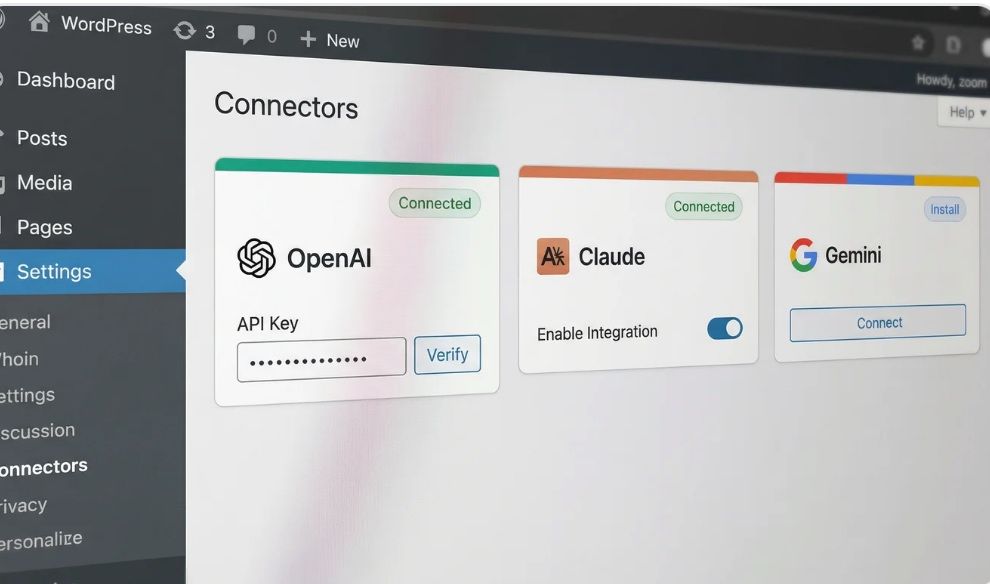
WordPress 7.0 Beta 2 arrived on February 26, 2026, and the most significant change isn’t a flashy design tool but a quiet addition to the settings menu that fundamentally changes how the CMS handles artificial intelligence.
This update introduces a new Settings > Connectors page, which acts as a centralized vault for storing API keys from major providers like OpenAI, Claude, and Gemini.
It is important to understand right away that this update is infrastructure rather than a feature you can play with immediately. It does not magically write blog posts for you. Instead, it provides the plumbing so that plugins can connect to these AI services using a single, standardized set of credentials stored securely in the core.
The New Connectors Page Explained
I have been poking around the backend since the release dropped, and the interface is deceptively simple. If you navigate to the general settings area, you will now see Connectors sitting there quietly.
It feels a bit like when they first added the privacy policy page. It’s boring but necessary.
The screen itself is straightforward. You get fields to input your API keys for the big three: OpenAI, Anthropic, and Google. Once you hit save, those keys are stored in the WordPress database.
What is interesting here is the intent. The goal is to create a “configure once, use everywhere” environment.
Before this, if I wanted to use an AI plugin for SEO meta descriptions and a different one for generating alt text, I usually had to paste my API key into two different settings screens. That was messy. It was also a security nightmare.
Now, WordPress is saying that the connection to the brain of the AI belongs in the core software. The plugins should just be the hands that do the work.
This UI is built on a PHP-based script and menu infrastructure. It uses route components from standard WordPress packages. It feels native because it is native. There is no bloat here.
Why We Needed a Standardized Keyring
I have managed client sites for nearly two years where AI integration was a requirement. It has been the Wild West. Every developer decided to build their own authentication flow.
Some stored keys in the database in plain text. Others tried to be clever with obfuscation. It was inconsistent.
The standardization in WordPress 7.0 Beta 2 changes the game for those of us managing multiple sites. It effectively creates a keyring. You put the key on the hook, and any authorized family member can borrow it to drive the car. But they don’t get to keep the key.
Rich Tabor, who is a well-known developer advocate, described this perfectly. He called it a “provider-agnostic layer.” That means the core software doesn’t care if you prefer GPT-4 or Claude 3.5 Sonnet. It just handles the handshake.
For developers, this is huge. They can stop writing boilerplate code to handle API connections. They can just call `wp.aiClient` and get to work building the actual feature.
It lowers the barrier to entry for creating Technical SEO tools that leverage AI.
It Is Plumbing, Not a Magic Faucet
I need to be very clear about this because I have already seen people on Twitter getting confused. Installing WordPress 7.0 Beta 2 does not give you a “Magic Write” button.
Think of it like plumbing in a house. This update installs the pipes and connects them to the water main. But if you don’t install a faucet (a plugin), you are not getting any water.
You can turn the handle all you want, but nothing will come out.
The Connectors page is strictly for credential management. It is not an interface for chatting with a bot. It is not a content generator. It is the boring backend stuff that makes the exciting frontend stuff possible.
Ray Morey from The Repository noted that this delivers on Matt Mullenweg’s vision for AI, but he also emphasized that it is infrastructure over features. I agree with him. It is the foundation.
You can’t build the penthouse until you pour the concrete slab.
If you are expecting to install this beta and immediately have your site rewrite its own code, you are going to be disappointed. You still need plugins to do the heavy lifting.
Technical Details for the Nerds
Let’s look under the hood for a minute. The way these keys are stored reminds me a lot of how WooCommerce handles payment gateway credentials. They are saved in the database, but access to them is restricted.
There is a new capability introduced called `prompt_ai`. This is a smart move. By default, only Administrators have this capability.
This prevents a situation where a Contributor or Author account could burn through your OpenAI credits by running a million unnecessary prompts.
The system tries to accommodate different security levels, but it defaults to the safest option. You can likely modify this with a role editor plugin if you really trust your editors, but I wouldn’t recommend it.
The `wp.aiClient` is the star here. It allows PHP and JavaScript to make calls to the AI models without the plugin needing its own wrapper. This reduces the file size of plugins & reduces the potential for conflicts.
I saw a demo kit released by Rich Tabor that uses this to auto-generate alt text and excerpts via structured JSON. That is exactly the kind of utility I want.
I don’t need AI to write my poetry. I need it to do the tedious SEO work that I hate doing.
Comparing Beta 1 and Beta 2
If you were paying attention to Beta 1, you might be confused. Beta 1 introduced something called the MCP Adapter. That was about AI agents controlling WordPress. It was inbound.
WordPress 7.0 Beta 2 flips the script. The Connectors page is about WordPress controlling the AI. It is outbound. This distinction matters.
The MCP Adapter is cool for automation. Imagine telling an agent to “update all plugins and check for errors.” That is the Beta 1 promise.
But Connectors are about “take this content and summarize it” or “translate this page into Spanish.”
They are two sides of the same coin. Both are necessary for a truly AI-native CMS. It seems the team is building the bridge from both ends, hoping they meet in the middle without collapsing.
I suspect the final release will clarify how these two systems interact. Right now, they feel like separate experiments that just happen to live in the same house.
What This Means for SEO and Agencies
I run an agency. We deal with clients who lose passwords like they lose socks. Asking a client to generate an OpenAI API key and send it to us securely is a friction point. Half the time they send it in an email subject line.
With the Connectors page, we can set this up once during the onboarding phase. We input our agency key (or theirs) into the core settings. Then we can install our standard suite of Technical SEO plugins, and they just work.
However, there is a catch. Billing.
If I use my agency API key on 50 client sites, I am paying for their usage. That gets expensive fast. I still need distinct keys for billing reasons unless I want to eat the cost as a value-add. So while the technical setup is easier, the administrative headache of who pays for the tokens hasn’t gone away.
There is also the potential for cleaner data. If we use the `wp.aiClient` to standardize how we generate schema markup or meta tags, we get more consistency. Consistency is the bedrock of good search performance.
Looking Ahead to the April Release
The full release of WordPress 7.0 is scheduled for April 9, 2026. That is just around the corner. Beta 2 marks the start of the stabilization phase.
This means no new features should be added. The team is now focused on fixing bugs and making sure the UI doesn’t break when you look at it wrong.
They are testing the extensibility via hooks like `connections-wp-admin-init`.
I am curious to see how the plugin ecosystem reacts. Will Yoast and RankMath adopt the standard Connectors immediately? Or will they stick to their own proprietary connection methods for a while? History tells me there will be a transition period where we have duplicate settings.
Pootlepress noted that this is groundwork for future development. I think that is the healthiest way to look at it. Don’t upgrade to 7.0 expecting a revolution on day one. Upgrade because it prepares your site for the tools that will be built in 2027.
It aligns with other features coming in 7.0, like real-time collaboration. The CMS is trying to become more dynamic. It is trying to shed its reputation as just a blogging platform from 2003.
Final Thoughts
I have been skeptical of the “AI everything” trend. A lot of it feels like noise. But this update feels different. It feels responsible.
By baking the connection layer into the core, WordPress is acknowledging that AI is not a plugin category anymore. It is a fundamental part of the web stack. Like a database or a server.
The Connectors page isn’t sexy. You won’t show it off to your clients to impress them. But it solves a real problem. It reduces friction. It improves security.
As we move toward the April release, I will be testing this heavily. I want to see what happens when the API limits are hit. I want to see how it handles errors. But for now, it looks like a solid step forward.
It is just plumbing. But good plumbing is the difference between a house you want to live in & a disaster waiting to happen.
